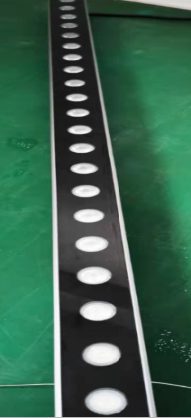
Pixel mapping a wall of LED fixtures without a media server is a challenging task that requires careful planning and execution. It involves controlling and displaying images or videos on a wall of LED fixtures using a controller or a software. This technique is commonly used in various applications such as stage lighting, architectural lighting, and advertising.
The short answer
You can pixel map a wall of LED fixtures without a media server using a controller like the RG-CTCLEDPEIN-1, which supports DMX512, Art-Net, and Kling-Net control modes, and costs USD 135.
What is pixel mapping?
Pixel mapping is a technique used to control and display images or videos on a wall of LED fixtures. It involves assigning a unique address to each LED fixture, allowing for precise control over the display. This technique is commonly used in various applications such as stage lighting, architectural lighting, and advertising.
What are the benefits of using a controller for pixel mapping?
Using a controller for pixel mapping offers several benefits, including precise control over the display, flexibility in terms of content and layout, and ease of use. Controllers like the RG-CTCLEDPEIN-1 support multiple control modes, making it easy to integrate with existing systems.
What type of LED fixtures are suitable for pixel mapping?
For pixel mapping, you need LED fixtures that can be individually addressed and controlled. Fixtures like the 24pcs 1.5W RGB Outdoor LED bar are suitable for pixel mapping. They have a high resolution and can display a wide range of colors.
How do I choose the right LED fixtures for my pixel mapping project?
To choose the right LED fixtures for your project, consider the size of the wall, the resolution you want to achieve, and the type of content you want to display. You should also consider the environmental conditions, such as outdoor or indoor use, and the power requirements.
What is the role of the controller in pixel mapping?
The controller plays a crucial role in pixel mapping, as it sends the control signals to the LED fixtures. Controllers like the RG-CTCLEDPEIN-1 support multiple control modes, making it easy to integrate with existing systems.
How do I configure the controller for pixel mapping?
To configure the controller for pixel mapping, you need to set the address of each LED fixture, define the layout of the fixtures, and upload the content to be displayed. The controller's user manual should provide detailed instructions on how to do this.
What are the common challenges faced in pixel mapping?
Common challenges faced in pixel mapping include achieving uniform brightness and color consistency, dealing with signal loss or interference, and ensuring that the content is properly aligned and scaled.
How do I troubleshoot issues with my pixel mapping project?
To troubleshoot issues with your pixel mapping project, check the connections and wiring, verify that the controller is properly configured, and ensure that the LED fixtures are functioning correctly. You can also consult the user manual or contact the manufacturer's support team for assistance.
What are the advantages of using outdoor-rated LED fixtures for pixel mapping?
Using outdoor-rated LED fixtures like the 24pcs 1.5W RGB Outdoor LED bar offers several advantages, including durability, weather resistance, and high brightness. These fixtures are designed to withstand harsh environmental conditions and can provide a reliable and long-lasting display.
How do I determine the right size and configuration for my pixel mapping project?
To determine the right size and configuration for your project, consider the size of the wall, the resolution you want to achieve, and the type of content you want to display. You can use a calculator or consult with a professional to determine the optimal size and configuration for your project.
What are the different types of controllers available for pixel mapping?
There are several types of controllers available for pixel mapping, including DMX controllers, Art-Net controllers, and Kling-Net controllers. Each type of controller has its own advantages and disadvantages, and the choice of controller depends on the specific requirements of the project.
How do I choose the right controller for my pixel mapping project?
To choose the right controller for your project, consider the type of LED fixtures you are using, the size and complexity of the project, and the level of control you need. You should also consider the compatibility of the controller with your existing systems and the ease of use.
| Model | Configuration | EXW Price | Volume Tier |
|---|---|---|---|
| RG-CTCLEDPEIN-1 | 40 LEDs pixel led light controller | USD 135 | over 100 pcs |
| 24pcs 1.5W RGB Outdoor LED bar | 24pcs 1.5W RGB Outdoor LED bar Wall Washer | USD 49 | over 100 pcs |
You can visit our website to learn more about our products, including the RG-CTCLEDPEIN-1 and the 24pcs 1.5W RGB Outdoor LED bar. Contact us to discuss your pixel mapping project and determine the best solution for your needs. Next, review the specifications of the RG-CTCLEDPEIN-1 controller and the 24pcs 1.5W RGB Outdoor LED bar to determine if they meet your project requirements.
What are the key considerations for selecting the right LED fixtures for pixel mapping?
When it comes to pixel mapping, the type and number of LED fixtures used can greatly impact the overall visual effect. The fixtures should be able to produce a high level of brightness, color accuracy, and uniformity. Additionally, they should be able to be controlled and synchronized with a controller to achieve the desired pixel mapping effect. In this article, we will discuss the key considerations for selecting the right LED fixtures for pixel mapping and provide some guidance on how to choose the right fixtures for your specific project.
What the catalogue actually charges for these
| Model | Configuration | EXW |
|---|---|---|
| RG-CA8802 | 8 outputs | US$51 |
| Model | Configuration | EXW |
|---|---|---|
| RG-CA8402MINI | 4 outputs | US$51 |
Where to compare the models mentioned above
The two catalogue pages that carry the configurations in these tables are DMX Control Pixel LED Lifting and 24pcs 1.5W RGB Outdoor LED bar. Open each one for the full spec list, the volume tiers and the current EXW price.
Frequently Asked Questions
What is pixel mapping?
Pixel mapping is a technique used to control and display images or videos on a wall of LED fixtures. It involves assigning a unique address to each LED fixture, allowing for precise control over the display.
Do I need a media server for pixel mapping?
No, you don't necessarily need a media server for pixel mapping. You can use a controller like the RG-CTCLEDPEIN-1 to control the LED fixtures.
What is the minimum number of LED fixtures required for pixel mapping?
There is no minimum number of LED fixtures required for pixel mapping. However, a larger number of fixtures can provide a more detailed and higher-resolution display.
Can I use indoor LED fixtures for outdoor pixel mapping?
No, indoor LED fixtures are not suitable for outdoor use. You should use outdoor-rated fixtures like the 24pcs 1.5W RGB Outdoor LED bar.
How do I determine the right size and configuration for my pixel mapping project?
To determine the right size and configuration for your project, consider the size of the wall, the resolution you want to achieve, and the type of content you want to display.
Need help choosing fixtures for your project? Tell us the venue type and room size — we'll spec it for free.
Request a Free Rig Spec →