Pixel mapping a wall of LED fixtures without a media server can be a challenging task, but it is possible with the right equipment and knowledge. This guide is intended for technicians who want to learn how to pixel map a wall of LED fixtures without a media server.
The short answer
You can pixel map a wall of LED fixtures without a media server using a controller like the RG-CTCLEDPEIN-1, which can control up to 40 LEDs, and costs USD 135.
What is pixel mapping?
Pixel mapping is a technique used to control and display images or videos on a wall of LED fixtures. It involves assigning a unique address to each LED fixture, allowing for precise control over the color and intensity of each fixture. This technique is commonly used in stage lighting, concerts, and other events where a high level of control over the lighting is required.
What type of LED fixtures are suitable for pixel mapping?
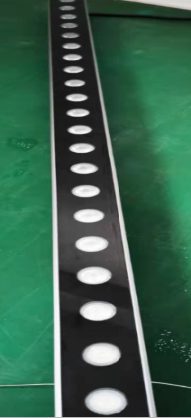
LED fixtures with RGB color changing capabilities, such as the 24pcs 1.5W RGB Outdoor LED bar, are suitable for pixel mapping. These fixtures have the ability to change color and intensity, allowing for a wide range of creative possibilities.
How do I choose the right controller for my LED fixtures?
You should choose a controller that is compatible with your LED fixtures and can handle the number of fixtures you have. The RG-CTCLEDPEIN-1, for example, can control up to 40 LEDs, making it a good choice for smaller to medium-sized installations.
What are the key considerations when choosing a controller?
When choosing a controller, you should consider the number of LED fixtures you have, the type of fixtures, and the level of control you need. You should also consider the cost and the compatibility of the controller with your fixtures.
Can I use a DMX controller for pixel mapping?
Yes, you can use a DMX controller like the DMX Control Pixel LED Lifting for pixel mapping. However, you will need to ensure that your LED fixtures are DMX compatible. The DMX Control Pixel LED Lifting costs USD 18.5 and has a lifting range of 0.5M.
How do I connect my LED fixtures to the controller?
You should connect your LED fixtures to the controller according to the manufacturer's instructions. Typically, this involves connecting the fixtures to the controller using a cable or wire.
What is the difference between a media server and a controller?
A media server is a computer-based system that is used to control and display images or videos on a wall of LED fixtures. A controller, on the other hand, is a device that is used to control the LED fixtures directly. While a media server can provide more advanced features and capabilities, a controller can be a more cost-effective and simpler solution.
How do I program the controller?
You should program the controller according to the manufacturer's instructions. Typically, this involves using a software program to create a map of the LED fixtures and assign addresses to each fixture.
What are the benefits of using a controller instead of a media server?
Using a controller instead of a media server can be more cost-effective and simpler. Controllers are often less expensive than media servers and can be easier to use and program.
How do I troubleshoot common issues with pixel mapping?
If you are experiencing issues with pixel mapping, you should first check the connections between the LED fixtures and the controller. You should also check the programming of the controller to ensure that it is correct.
| Model | Configuration | EXW Price | Volume Tier |
|---|---|---|---|
| 24pcs 1.5W RGB Outdoor LED bar | 24pcs 1.5W RGB | USD 49 | over 100 pcs |
| RG-CTCLEDPEIN-1 | 40 LEDs | USD 135 | over 100 pcs |
| DMX Control Pixel LED Lifting | point control | USD 18.5 | - |
You can find more information about the 24pcs 1.5W RGB Outdoor LED bar and the RG-CTCLEDPEIN-1 on our website.
Next, you should test the LED fixtures and the controller to ensure that they are working correctly. If you are still experiencing issues, you may want to consider consulting the manufacturer's instructions or contacting a professional for assistance.
What the catalogue actually charges for these
| Model | Configuration | EXW |
|---|---|---|
| RG-PDS28S10IA-V25 | 6pcs 5050 RGB | US$75 |
| DMX Control Pixel LED Lifting | point control | US$18.5 |
| RG-CTCLEDPEIN-1 | 40 LEDs | US$135 |
| Model | Configuration | EXW |
|---|---|---|
| RG-EL004FL-3e42 | 729/720/480/489 | US$76 |
| 24pcs 1.5W RGB Outdoor LED bar | 24*1.5w RGB 3 IN 1 | US$49 |
| RG-PDS56S125IA-V0 | 64 pixels | US$179 |
Where to compare the models mentioned above
The two catalogue pages that carry the configurations in these tables are RG-PDS28S10IA-V25 and DMX Control Pixel LED Lifting. Open each one for the full spec list, the volume tiers and the current EXW price.
Frequently Asked Questions
What is pixel mapping?
Pixel mapping is a technique used to control and display images or videos on a wall of LED fixtures. It involves assigning a unique address to each LED fixture, allowing for precise control over the color and intensity of each fixture.
Do I need a media server for pixel mapping?
No, you don't necessarily need a media server for pixel mapping. You can use a controller like the RG-CTCLEDPEIN-1 to control the LED fixtures.
What type of LED fixtures are suitable for pixel mapping?
LED fixtures with RGB color changing capabilities, such as the 24pcs 1.5W RGB Outdoor LED bar, are suitable for pixel mapping.
How do I choose the right controller for my LED fixtures?
You should choose a controller that is compatible with your LED fixtures and can handle the number of fixtures you have. The RG-CTCLEDPEIN-1, for example, can control up to 40 LEDs.
Can I use a DMX controller for pixel mapping?
Yes, you can use a DMX controller like the DMX Control Pixel LED Lifting for pixel mapping. However, you will need to ensure that your LED fixtures are DMX compatible.
Need help choosing fixtures for your project? Tell us the venue type and room size — we'll spec it for free.
Request a Free Rig Spec →