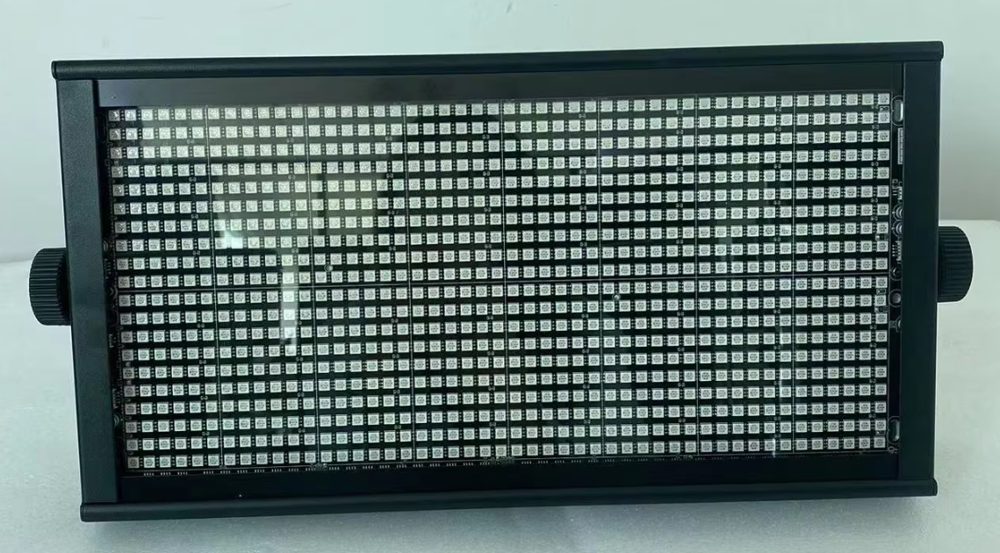
Live streaming has become an essential part of many industries, including entertainment, education, and business. One of the critical aspects of live streaming is lighting, as it can greatly affect the quality of the video and the overall viewer experience. Lighting a live-streamed set requires careful consideration of colour temperature, flicker, and camera-safe dimming.
The short answer
For live streaming, use a colour temperature of 3200K, such as the 300W LED Panel light -warm, and ensure camera-safe dimming to avoid flicker.
What is colour temperature and why is it important for live streaming?
Colour temperature refers to the warmth or coolness of a light source, measured in Kelvin (K). For live streaming, a colour temperature of 3200K is often preferred as it provides a warm and natural look. However, this can vary depending on the specific requirements of the production. The 300W LED Panel light -warm, for example, has a colour temperature of 3200K/5600K/2-in-1 optional.
How do I choose the right colour temperature for my live stream?
When choosing a colour temperature for your live stream, consider the specific requirements of your production. If you're shooting a talk show or interview, a warmer colour temperature such as 3200K may be more suitable. However, if you're shooting a concert or music performance, a cooler colour temperature such as 5600K may be more appropriate.
What is flicker and how can I avoid it in my live stream?
Flicker refers to the rapid change in brightness of a light source, which can cause distractions and affect the quality of the live stream. To avoid flicker, use lighting fixtures with a high frequency rate, such as the RG-ST112A-S20f336A, which has a frequency range of 50-60Hz.
How do I ensure camera-safe dimming for my live stream?
Camera-safe dimming refers to the ability of a lighting fixture to dim without causing flicker or other issues that can affect the quality of the live stream. The RG-ST1000B-S30f1000A, for example, has a dimming range of 0-100%. When choosing lighting fixtures for your live stream, ensure that they have camera-safe dimming capabilities.
What are the benefits of using LED lighting fixtures for live streaming?
LED lighting fixtures, such as the 300W LED Panel light -warm, offer several benefits for live streaming, including energy efficiency, long lifespan, and flexibility. They also provide a high colour rendering index (CRI), which is essential for capturing accurate colours and details.
How do I position my lighting fixtures for optimal results?
When positioning your lighting fixtures, consider the size of the set and the number of cameras being used. A general rule of thumb is to use a combination of key, fill, and backlight to create a balanced and visually appealing lighting setup. The RG-TH8B600S, for example, is an eight-eye audience light that can be used to create a versatile lighting setup.
What are the key considerations when choosing lighting fixtures for live streaming?
When choosing lighting fixtures for live streaming, consider factors such as colour temperature, flicker, and camera-safe dimming. It's also essential to think about the specific requirements of your production, such as the size of the set and the number of cameras being used.
Can I use outdoor lighting fixtures for live streaming?
While outdoor lighting fixtures, such as the RG-ST1344A-SO, can be used for live streaming, they may not be the best choice due to their high power consumption and potential for flicker. It's generally better to use indoor lighting fixtures specifically designed for live streaming.
How do I ensure that my lighting fixtures are compatible with my cameras?
When choosing lighting fixtures for live streaming, ensure that they are compatible with your cameras. Consider factors such as the camera's sensitivity, resolution, and frame rate. The RG-ST112A-S20f336A, for example, is compatible with a wide range of cameras and can be controlled using DMX or sound.
What are the benefits of using DMX control for live streaming?
DMX control offers several benefits for live streaming, including flexibility, precision, and ease of use. The RG-ST1000B-S30f1000A, for example, can be controlled using DMX, allowing for precise control over the lighting setup.
How do I troubleshoot common lighting issues in live streaming?
When troubleshooting common lighting issues in live streaming, consider factors such as flicker, colour temperature, and camera compatibility. Ensure that your lighting fixtures are properly positioned and configured, and that you are using the correct settings for your cameras.
| Model | Colour Temperature | Flicker | Camera-Safe Dimming | EXW Price |
|---|---|---|---|---|
| 300W LED Panel light -warm | 3200K/5600K/2-in-1 optional | No | Yes | $205 |
| RG-ST112A-S20f336A | No | Yes | $58 | |
| RG-ST1000B-S30f1000A | No | Yes | $88 |
To learn more about the 300W LED Panel light -warm, visit the 300W LED Panel light -warm product page. For more information on the RG-ST112A-S20f336A, visit the RG-ST112A-S20f336A product page.
Next, contact us to discuss your live streaming lighting needs and determine the best lighting fixtures for your production.
What the catalogue actually charges for these
| Model | Configuration | EXW |
|---|---|---|
| RG-CA8802 | 8 outputs | US$51 |
| RG-ST112A-S20f336A | 3 in1 high brightness LED5050SMD | US$58 |
| Model | Configuration | EXW |
|---|---|---|
| RG-ST1000B-S30f1000A | 3 in1 high brightness LED5054 SMD | US$88 |
| RG-ST1344A-SO | 1344 5050 three color LED lamp beads | US$178 |
Where to compare the models mentioned above
The two catalogue pages that carry the configurations in these tables are 300W LED Panel light -warm and RG-ST112A-S20f336A. Open each one for the full spec list, the volume tiers and the current EXW price.
Frequently Asked Questions
What colour temperature is best for live streaming?
For live streaming, a colour temperature of 3200K is often preferred as it provides a warm and natural look. However, this can vary depending on the specific requirements of the production. It's also important to consider the colour temperature of the lighting fixtures, such as the 300W LED Panel light -warm, which has a colour temperature of 3200K/5600K/2-in-1 optional.
How do I avoid flicker in my live stream?
To avoid flicker in your live stream, it's essential to use lighting fixtures with a high frequency rate, such as the RG-ST112A-S20f336A, which has a frequency range of 50-60Hz. Additionally, using camera-safe dimming can help to prevent flicker.
What is camera-safe dimming?
Camera-safe dimming refers to the ability of a lighting fixture to dim without causing flicker or other issues that can affect the quality of the live stream. The RG-ST1000B-S30f1000A, for example, has a dimming range of 0-100%.
How do I choose the right lighting fixtures for my live stream?
When choosing lighting fixtures for your live stream, consider factors such as colour temperature, flicker, and camera-safe dimming. It's also essential to think about the specific requirements of your production, such as the size of the set and the number of cameras being used.
Can I use outdoor lighting fixtures for live streaming?
While outdoor lighting fixtures, such as the RG-ST1344A-SO, can be used for live streaming, they may not be the best choice due to their high power consumption and potential for flicker. It's generally better to use indoor lighting fixtures specifically designed for live streaming.
Need help choosing fixtures for your project? Tell us the venue type and room size — we'll spec it for free.
Request a Free Rig Spec →