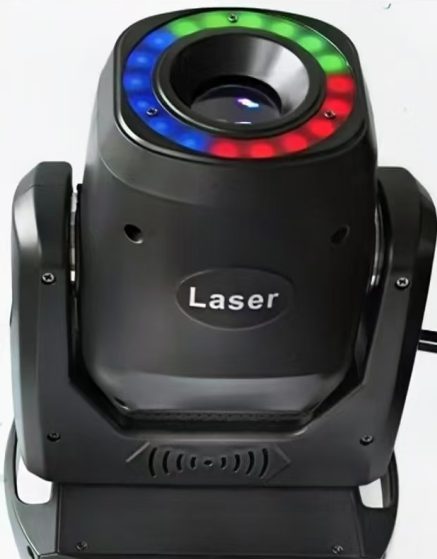
Movement macros on moving heads are a crucial aspect of lighting design, allowing designers to create intentional and repetitive movements that enhance the visual effects of a performance or event. For technicians and lighting designers, understanding how to create and program movement macros is essential for creating a engaging and dynamic lighting design.
The short answer
To create intentional movement macros on moving heads, use a 6W Moving head full color laser and program it with a speed of 540 degrees per second on the X axis and 270 degrees per second on the Y axis.
What is the purpose of movement macros on moving heads?
Movement macros on moving heads are used to create intentional and repetitive movements, such as circles, ballyhoo, and figure-8 cues, to enhance the visual effects of a lighting design. They can be used to create a variety of effects, from simple to complex, and can be programmed to work in conjunction with other lighting elements.
How do I choose the right moving head for my design?
When choosing a moving head, consider the size and type of venue, the type of event or performance, and the desired lighting effects. For example, the 6W Moving head full color laser is suitable for small to medium-sized venues and can create a variety of colorful effects. On the other hand, the New 295W 10R beam moving head is more suitable for larger venues and can create a more intense beam effect.
What are the key considerations when programming movement macros?
When programming movement macros, consider the speed and accuracy of the movement, as well as the overall aesthetic of the design. It's also important to consider the capabilities and limitations of the moving head being used, such as the beam angle and zoom range. Additionally, consider the overall lighting design and how the movement macros will work in conjunction with other lighting elements.
Can I use movement macros with other lighting elements?
Yes, movement macros can be used in conjunction with other lighting elements, such as LED lights, strobes, and fog machines, to create a more complex and engaging lighting design. By combining movement macros with other lighting elements, designers can create a wide range of effects and moods.
How do I troubleshoot issues with my movement macros?
If you're experiencing issues with your movement macros, check the programming and settings of the moving head, as well as the overall lighting design. Make sure that the moving head is properly calibrated and that the macros are programmed correctly. If issues persist, consult the user manual or contact the manufacturer for support.
What are the benefits of using movement macros in lighting design?
The benefits of using movement macros in lighting design include the ability to create complex and engaging effects, the ability to enhance the overall aesthetic of the design, and the ability to add an extra layer of depth and interest to the performance or event.
How do I program a movement macro on a moving head?
To program a movement macro on a moving head, use the control mode self-walking, voice control, or DMX 512. Set the speed and accuracy of the movement, as well as the overall aesthetic of the design. Consider the capabilities and limitations of the moving head being used, such as the beam angle and zoom range.
What are the different types of movement macros that can be used in lighting design?
The different types of movement macros that can be used in lighting design include circles, ballyhoo, and figure-8 cues. These macros can be programmed to work in conjunction with other lighting elements, such as LED lights, strobes, and fog machines, to create a more complex and engaging lighting design.
How do I choose the right speed and accuracy for my movement macros?
When choosing the right speed and accuracy for your movement macros, consider the overall aesthetic of the design and the capabilities and limitations of the moving head being used. A speed of 540 degrees per second on the X axis and 270 degrees per second on the Y axis is suitable for most applications.
What are the key considerations when using movement macros in outdoor lighting designs?
When using movement macros in outdoor lighting designs, consider the weather conditions, the size and type of venue, and the desired lighting effects. The NEW outdoor IP65 7leds*60w LED moving head light RG-ML420WC-KCH93 is suitable for outdoor use and can create a variety of effects.
How do I integrate movement macros with other lighting elements in my design?
To integrate movement macros with other lighting elements in your design, consider the overall aesthetic of the design and the capabilities and limitations of the moving head being used. Use the control mode self-walking, voice control, or DMX 512 to program the movement macros and combine them with other lighting elements, such as LED lights, strobes, and fog machines.
| Model | Configuration | EXW Price | Volume Tier |
|---|---|---|---|
| 6W Moving head full color laser | Laser Module Power: Beam range X axis 540 degrees, Y axis 270 degrees | $375 | - |
| New 295W 10R beam moving head | Life: 2200 hours | $332 | - |
| RG-M230BN-KMH16 | life: 2200 hours | $179 | $159 (over 100 pcs) |
To learn more about the 6W Moving head full color laser, visit 6W Moving head full color laser. To learn more about the New 295W 10R beam moving head, visit New 295W 10R beam moving head. Next, review the specifications of the RG-M230BN-KMH16 and determine if it is suitable for your lighting design.
How do the different types of movement macros used in lighting design impact the overall aesthetic and functionality of a show?
Movement macros are a crucial aspect of lighting design, allowing designers to create complex and dynamic lighting effects. The different types of movement macros, such as pan-and-tilt, orbit, and zoom, can greatly impact the overall aesthetic and functionality of a show. For example, a pan-and-tilt macro can create a sense of movement and energy, while an orbit macro can add a sense of depth and dimensionality. By carefully selecting and programming movement macros, designers can create a cohesive and engaging lighting design that enhances the overall performance.
What the catalogue actually charges for these
| Model | Configuration | EXW |
|---|---|---|
| RG-ML420WC-KCH93 | 7 LEDs*60W | US$590 |
| Model | Configuration | EXW |
|---|---|---|
| RG-ML760WC-KCH99 | 19 LEDs*40W | US$560 |
Where to compare the models mentioned above
The two catalogue pages that carry the configurations in these tables are New 295W 10R beam moving head and 6W Moving head full color laser. Open each one for the full spec list, the volume tiers and the current EXW price.
Frequently Asked Questions
What is the purpose of movement macros on moving heads?
Movement macros on moving heads are used to create intentional and repetitive movements, such as circles, ballyhoo, and figure-8 cues, to enhance the visual effects of a lighting design. They can be used to create a variety of effects, from simple to complex, and can be programmed to work in conjunction with other lighting elements. By using movement macros, lighting designers can add an extra layer of depth and interest to their designs.
How do I choose the right moving head for my design?
When choosing a moving head, consider the size and type of venue, the type of event or performance, and the desired lighting effects. For example, the 6W Moving head full color laser is suitable for small to medium-sized venues and can create a variety of colorful effects. On the other hand, the New 295W 10R beam moving head is more suitable for larger venues and can create a more intense beam effect.
What are the key considerations when programming movement macros?
When programming movement macros, consider the speed and accuracy of the movement, as well as the overall aesthetic of the design. It's also important to consider the capabilities and limitations of the moving head being used, such as the beam angle and zoom range. Additionally, consider the overall lighting design and how the movement macros will work in conjunction with other lighting elements.
Can I use movement macros with other lighting elements?
Yes, movement macros can be used in conjunction with other lighting elements, such as LED lights, strobes, and fog machines, to create a more complex and engaging lighting design. By combining movement macros with other lighting elements, designers can create a wide range of effects and moods.
How do I troubleshoot issues with my movement macros?
If you're experiencing issues with your movement macros, check the programming and settings of the moving head, as well as the overall lighting design. Make sure that the moving head is properly calibrated and that the macros are programmed correctly. If issues persist, consult the user manual or contact the manufacturer for support.
Need help choosing fixtures for your project? Tell us the venue type and room size — we'll spec it for free.
Request a Free Rig Spec →